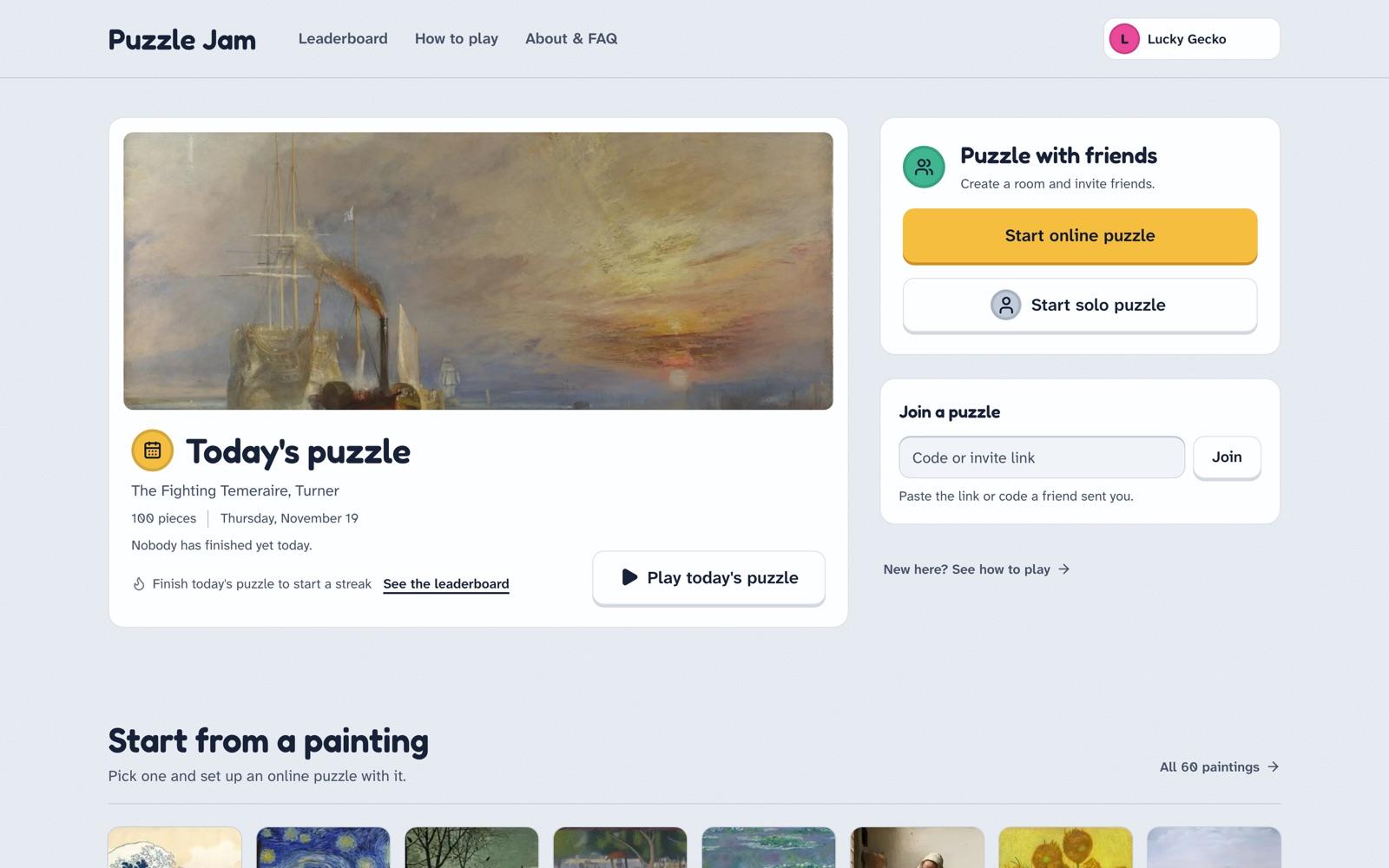
Jigsaw puzzles are more fun with other people, even when they live somewhere else. Most jigsaw sites treat puzzles as a quiet solo hobby, with multiplayer added on as an extra. I wanted the opposite: send a link, and everyone is on the same board, seeing each other's cursors and pieces moving.
So I built Puzzle Jam. You pick a painting or upload your own photo, choose between 24 and 1000 pieces and share the link. Nobody needs an account. You can solve the puzzle together, race each other, or play in teams. There is also one daily puzzle that's the same for everyone, with a leaderboard and streaks.
My Role
I built it on my own: game logic, the board renderer, the realtime sync, the API and database, the design, and hosting. It's available in German, English and Japanese, with light and dark mode.
What it does
- Co-op: one shared board. Pieces someone is holding are locked for everyone else.
- Race and team race: each player or team gets their own copy, and the first to finish wins. Players who are done can watch the others' boards live.
- Score attack: one shared board, with points for every connection.
- Daily puzzle: one painting per day for everyone, with solve times, streaks and a share card.
- Tables: a group keeps one link for an evening of games. Players suggest and vote on the next picture, and points add up over the evening.
- Pictures: 60 hand-picked public-domain paintings, thousands of open-access works from The Met and the Rijksmuseum to browse, or your own upload.
- Solo: saved in the browser and playable offline.
Screens
 The board at the start of a puzzle
 Setting up a puzzle
Technical Challenges
I didn't want to run a websocket server. Players connect to Supabase Realtime instead: Broadcast carries cursors and pieces while they're being dragged, and Presence shows who is in the room. Neither touches the database. Only when a piece is dropped does the client run the snapping logic, broadcast the result and save it.
Those saves had to be reliable. Each one keeps an id until the server confirms it, and the server records the pieces, points and completion in a single transaction. A save that is sent twice is applied once, so a flaky connection can't award points twice. When two players grab the same piece at the same moment, the earlier grab wins.
Every piece is generated from a seed, so all boards in a room start identical and a board only stores the pieces that moved, at 20 bytes each. The board is drawn with PixiJS, and most of the polish went into the moment a piece snaps into place: sound, a short glow and pieces that visibly settle.
The game logic lives in a shared package, so a native iOS app built with Expo and Skia, which I'm working on now, uses the same rules and sync.
Details
Snapping and locking
Pieces join their neighbours when dropped close enough, but they don't lock onto the board just because they're near their spot. Only a group that holds a corner locks on its own. Every other piece locks by joining a neighbour that is already locked. That keeps the real jigsaw feel of building from the corners and edges inward. Locked pieces are drawn flat and can't be moved by accident.
Finding pieces
A 1000-piece puzzle doesn't fit on one screen. "Tidy pieces" sorts loose pieces into rings of slots around the board, and pieces already in a slot stay where they are. The order is seeded, so tidying never gives away where a piece belongs. Pills at the screen edge point to pieces outside the view, and a small overview map shows the whole table. Everything also works with the keyboard.
Tables
An online puzzle is a table that lasts the whole evening, not a one-off room. The host sets up each game in a lobby, everyone else suggests pictures and votes, and the most-voted picture is used for the next round. Races award placement points that add up over the evening. If the host's connection drops for 60 seconds, another player can take over, so one lost connection doesn't end the evening.
Fair play without accounts
Everyone plays with an anonymous Supabase session that is created on their first action, without a form. Because guest accounts cost nothing, the API limits how many rooms, joins, uploads and saves a single player can make. Finish times come from the client, so the server checks them: a ranked finish faster than 250 ms per piece doesn't count, and points can't exceed what the moved pieces allow. Signing in with Apple or Google later moves the guest's rooms and results into the account.
Privacy
The database tables have row-level security turned on with no policies, so Supabase's public API can't read or write them. Only the server can. An uploaded photo is only visible to people who have that table's link, and there is no public gallery. Guests keep up to 3 uploads, which are deleted after a week without use.
The painting collection
Besides the 60 hand-picked paintings, players can browse thousands of open-access works from The Met and the Rijksmuseum. A script collects them and filters for families, and each work is only copied into our storage the first time someone plays it. On that first pick the server downloads the image, trims plain scan borders, resizes it with sharp and stores it.
Sharing the daily result
The daily result has a Share button. The shared link opens a server-rendered page whose preview image is generated on request with satori and sharp: the painting, the player's name, time and streak. Japanese text and names in other scripts load only the glyphs they need from Google Fonts.
Testing
Game logic, snapping and save delivery have unit tests. The API tests run against a real Postgres to cover concurrent saves. Playwright tests play through lobbies, races, results and host handover at desktop and phone sizes, with separate browser contexts for the host, a guest and a waiting player. CI starts its own local Supabase stack for them.
Tech Stack
- TanStack Start, React, TypeScript, oRPC
- PixiJS for the board, Web Audio for sound
- Supabase (Postgres, Realtime, Auth, Storage), Drizzle
- Expo and Skia for the iOS app, in a Turborepo monorepo
- Hosted on Vercel, with tests for game logic, API concurrency and Playwright browser flows in CI